Featured Images
Feature Images are large images used at the top of content items on the RadicalNow! Website and in content listings and grids. These images should be specific sizes to preserve aspect ratio and sharp resolution on displays.
Blog Posts, Pages, and Knowledge Base Entries
Images should be PNG, JPG, or WEBP format. They should be oriented in landscape/horizontal and 2800px by 1000 px. Images of different resolution can be used as long as their aspect ration is 14:5 (2.8 / also known as 2.8:1) with an absolute minimum of 880 x 315 (smaller images will look grainy on hi resolution displays).
Calculating Aspect Ratio
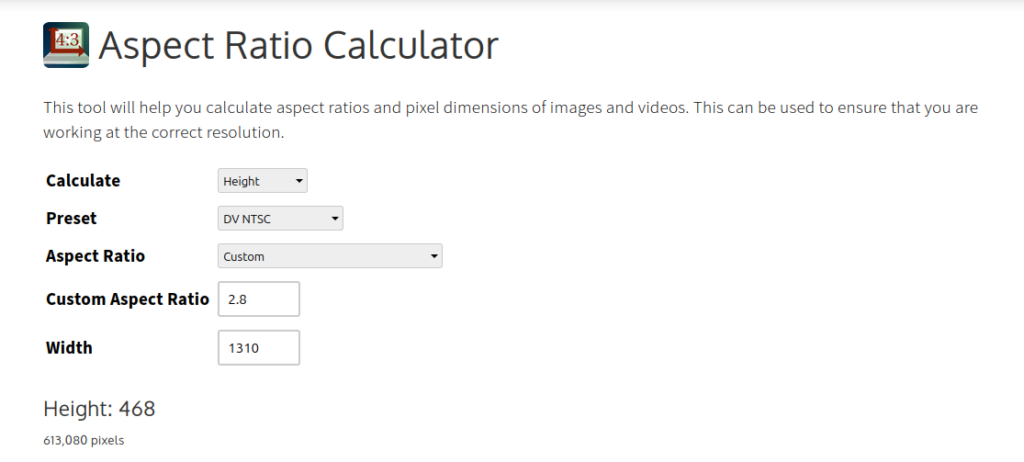
You can use a tool like the Aspect Ratio Calculator to figure out image size and maintain the proper aspect ration.
For example: Suppose a featured image for a blog post is only 1310px wide. What would be the height to maintain the blog aspect ratio of 14:5?
On the Aspect Ratio Calculator, switch the Calculate field to “Height”. This is what you want to find. Make sure Aspect Ratio is set to “Custom”. Enter “2.8” — the decimal equivalent for 14:5 — in Custom Aspect Ratio. Enter “1310” in Width. The calculator will return that the “Height: 468”.